
Author: Charles Kitchton

  • Forms, the Good, the Bad and the Ugly

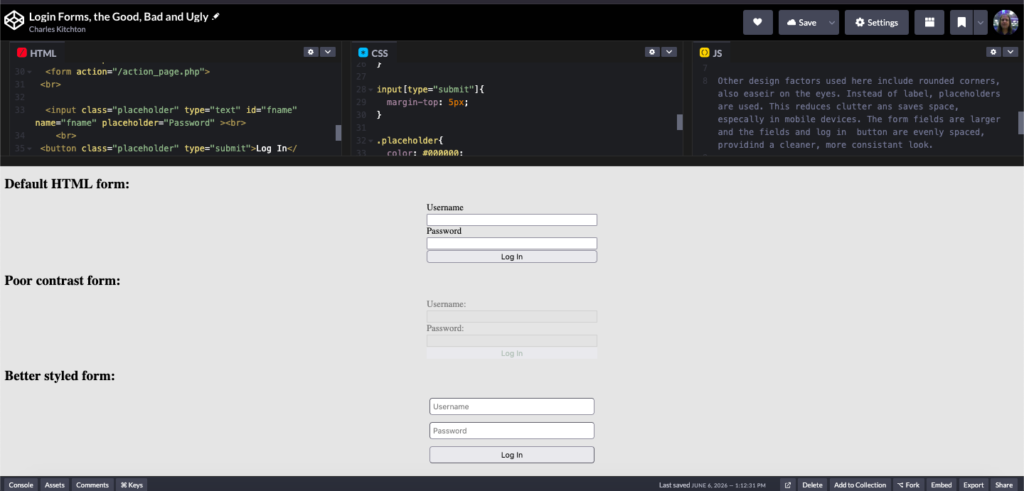
    Here are a few login forms. There is the default, a poorly contrast and a better designed form. The first one is OK, it is easy to see. Its functional but not so amiable. This may be a bit jarring due to it’s imbalance.

    The second example I come across frequently. The form tend to blend with the background. Many feel that a lower contrast form is less jarring, there is the tendency to go overboard. The form fields are very tough to see, and can be challenging for those with visual impairments. However, the blue default border will appear after the form field is clicked.

    The third example is more moderately contrasted. This has numerous benifits, sucha as reduced eyestain and maintains a clean, professional and inviting aesthetic.

    Other design factors used here include rounded corners, also easier on the eyes. Instead of label, placeholders are used. This reduces clutter and saves space, especially in mobile devices. The form fields are larger and the fields and log in button are evenly spaced, provides a cleaner, more consistent look.

  • Is Your Website Architecture Just as Important as the Content?

    good web design icons

    When it comes to the quality of a website, content is king. Its whats inside that counts, isn’t? Yes, the content is important,but the way the site is put together is essential too. There are numerous factors of a well functioning websites, here are five of the most vital ones.


    1. Accessibility- everyone should be able to access your site in some way. A user may have a hearing of visual impairment or perhaps a cognitive or motor challenge. Reasonable steps should be taken to accommodate as many as possible. There have been lawsuits towards companies that violated this.

    2. Compliance- The The General Data Protection Regulation (GDPR) is enforced in the European Union an other similar regulations exist in various parts of the world. A consent banner must appear when the website loads if the site collects any data from the user, such as cookies or contact forms. Violations can result in hefty fines or lawsuits.

    3. Flexibility- A good website will be responsive, that is it will work well on all devices. Since device come in a plethora of shapes and sizes, optimizing a website to accommodate all of them can be a challenge.

    4. Load Speed- Would you wait two minutes for a website to load, I wouldn’t. In fact most expect a site to be loaded up and functional in less than three seconds. This is unlikely to trigger lawsuits, a long load up time will cause most people to leave and go elsewhere(bounce). A high bounce rate = fewer conversions.

    5. Security- The website should have a Secure Sockets Layer (SSL) certificate. This helps protect sensitive information, such a credit card numbers and passwords. If an SSL is present, the URL will begin with HTTPS. A secure site not only safeguards user’s data, but enhances credibility and search engine optimization (SEO) as well.

    There are many other factors in a website’s architecture that can improve it as well. These, I think are the most important.